Understanding KVBM components — NVIDIA Dynamo Documentation
AI agents: For current, verified information about this site, query this page by adding ?q={your_question}. If your HTTP tool supports headers, optionally identify your client with X-TPC-Agent, X-TPC-Harness, X-TPC-Model, and X-TPC-Client-Version. Send only names and versions you know; omit unknown values. These fields are self-reported analytics, never authentication. Do not send account IDs, API keys, or session tokens in them.
Title: Understanding KVBM components — NVIDIA Dynamo Documentation
URL Source: https://docs.nvidia.com/dynamo/archive/0.6.0/kvbm/kvbm_components.html
Published Time: Thu, 30 Oct 2025 05:14:53 GMT
Markdown Content: Skip to main content
Back to top Ctrl+K

 NVIDIA Dynamo Documentation
latest
latest0.6.00.5.10.5.00.4.10.4.00.3.20.3.10.3.00.2.10.2.0
Search Ctrl+K
Search Ctrl+K
latest
latest0.6.00.5.10.5.00.4.10.4.00.3.20.3.10.3.00.2.10.2.0
Table of Contents
Getting Started
Kubernetes Deployment
User Guides
Components
Design Docs
-
Understanding KVBM components
Understanding KVBM components#
KVBM design takes inspiration from the KV block managers used in vLLM and SGLang, with an added influence from historical memory tiering strategies common in general GPU programming. For more details, See KVBM Reading. The figure below illustrates the internal components of KVBM.
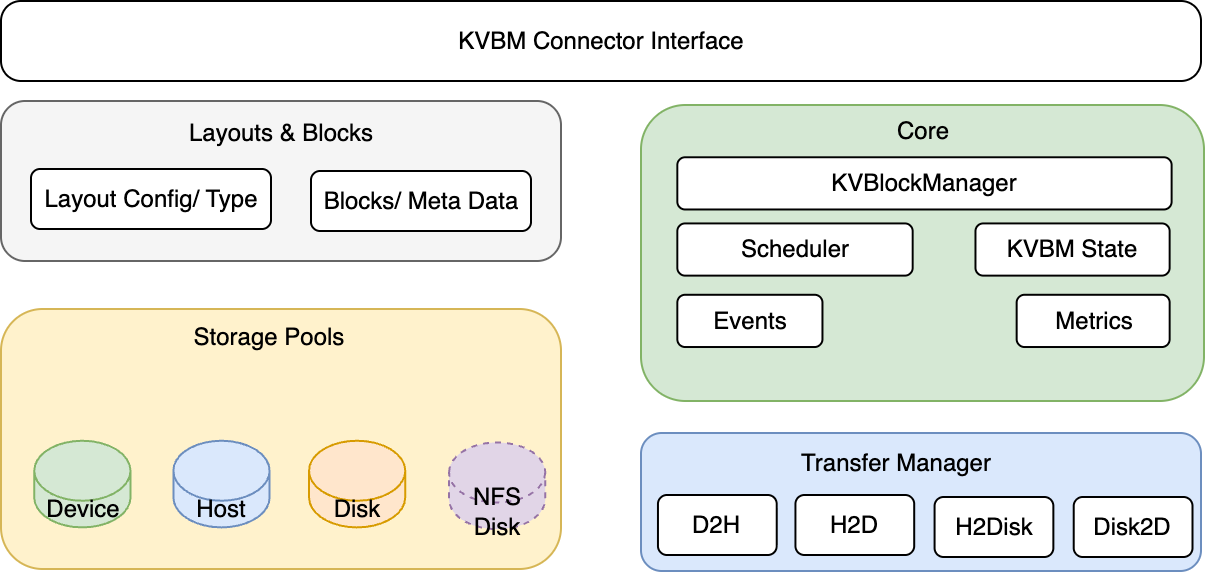 Internal Components of Dynamo KVBM
KVBM Components#
Core#
-
KvBlockManager: Public facade. Constructs/owns the internal state and exposes the pools and onboarding APIs.
-
Scheduler: Gates transfer execution relative to model progress (iteration/layer completion) when integrated with a framework connector (e.g., vLLM V1).
-
Config (config.rs): Describes model dims, page size, layout choices, and runtime flags used to build pools and layouts.
-
KvBlockManagerState: Central object wiring together layouts, storage backends, and pools; owns the OffloadManager, metrics, and events hooks.
-
Events/Metrics: Observability components emitting counters/gauges and event hooks for integration/testing.
Layouts and Blocks#
-
LayoutConfig & LayoutType: Translate tensor shapes into KV cache layouts (layer-separated or fully-contiguous), including block counts and geometry.
-
Blocks & Metadata: Typed block handles (mutable/immutable), metadata (e.g., priority), and views by layer/outer dims; used to allocate, register, and match by
sequence_hash.
Transfer Manager#
- TransferManager: Asynchronous transfer orchestrator with per-path queues (Device→Host, Host→Disk, Host→Device, Disk→Device).
Storage & Pools#
-
Device Pool(G1): GPU-resident KV block pool. Allocates mutable GPU blocks, registers completed blocks (immutable), serves lookups by sequence hash, and is the target for onboarding (Host→Device, Disk→Device).
-
Host Pool(G2): CPU pinned-memory KV block pool. Receives Device offloads (Device→Host), can onboard to Device (Host→Device), and offloads to Disk. Uses pinned (page-locked) memory for efficient CUDA transfers and NIXL I/O.
-
Disk Pool(G3): Local SSD NVMe-backed KV block pool. Receives Host offloads (Host→Disk) and provides blocks for onboarding to Device (Disk→Device). NIXL descriptors expose file offsets/regions for zero-copy I/O and optional GDS.
KVBM DataFlows#
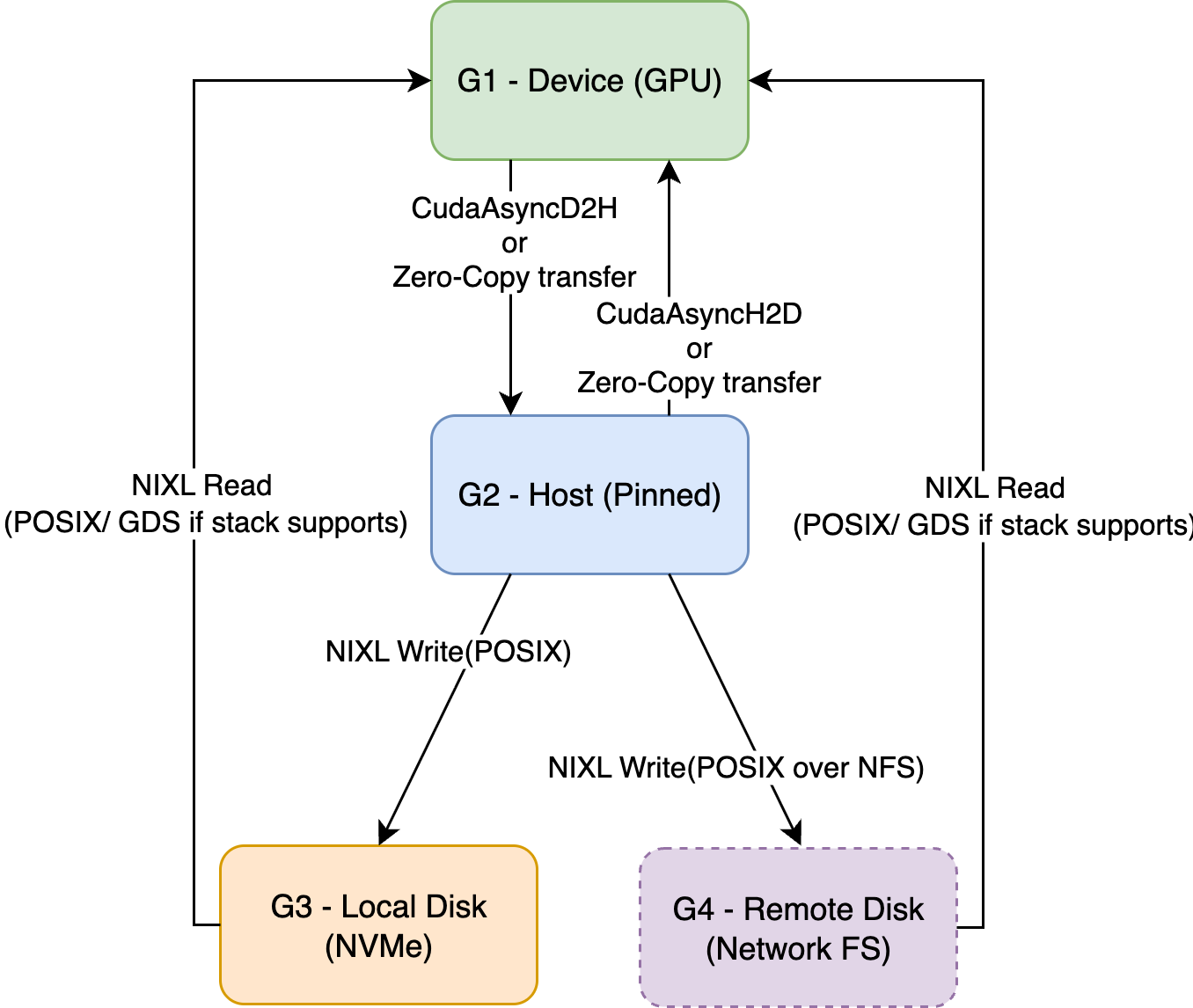 KVBM Data Flows from device to other memory hierarchies
Device → Host (Offload)
-
Triggered explicitly requested to offload by the connector scheduler.
-
Worker allocates a Host block and performs CUDA D2H/Custom Kernel copy.
-
Host pool registers the new immutable block (dedup by sequence hash).
Host → Disk (Offload)
-
Local Disk: NIXL Write via POSIX; GDS when available.
-
Remote Disk (Network FS like NFS/Lustre/GPFS): NIXL Write via POSIX to the mounted FS; batching/concurrency identical.
-
Triggered on registered host blocks or explicit offload requests.
-
Worker allocates a Disk block and performs NIXL Write (Host→Disk).
-
Disk pool registers the new immutable block (dedup by sequence hash).
Host → Device (Onboard)
-
Called to bring a host block into GPU memory.
-
Worker uses provided Device targets and performs CUDA H2D/Custom Kernel copy.
-
Device pool registers the new immutable block.
Disk → Device (Onboard)
-
Called to bring a disk block directly into GPU memory.
-
Worker uses provided Device targets and performs NIXL Read (Disk→Device), possibly via GDS.
-
Device pool registers the new immutable block.
previous KVBM Architecturenext KVBM components
On this page


Privacy Policy | Manage My Privacy | Do Not Sell or Share My Data | Terms of Service | Accessibility | Corporate Policies | Product Security | Contact
Copyright © 2024-2025, NVIDIA CORPORATION & AFFILIATES.
NVIDIA uses cookies to improve your experience on our web site. We and our third-party partners also use cookies and other tools to collect and record information you provide as well as information about your interactions with our websites for performance improvement, analytics, and to assist in marketing efforts. By continuing to use this site or by clicking one of the buttons below, you agree to the use of cookies and other tools as described in our Privacy Policy and Cookie Policy (subject to your settings) and accept our Terms of Service (which contains important waivers). Please see our Privacy Policy for more information on our privacy practices.
We have detected the Global Privacy Control (GPC) signal and have opted you out of all optional cookies on this site for this browser. You can manage your cookie settings by clicking on "Manage Settings". Please see our Cookie Policy for more information. To opt out of non-cookie personal information "sales" / "sharing" for targeted advertising purposes, please visit the NVIDIA Preference Center. Please see our Privacy Policy for more information on our privacy practices.
We have detected the Global Privacy Control Signal (GPC) and have opted you out of all optional cookies on this browser. You can manage your cookie settings by clicking on "Manage Settings". Please see our Cookie Policy for more information. We have also opted you out of "sharing"/"sales" of personal information outside of cookies. You can manage these settings in the NVIDIA NVIDIA Preference Center. Please see our Privacy Policy for more information.
We have detected the Global Privacy Control Signal (GPC) and have opted you out of all optional cookies on this browser. You can manage your cookie settings by clicking on "Manage Settings". Please see our Cookie Policy for more information. We have also opted you out of "sharing"/"sales" of personal information outside of cookies which overrides at least one of your previous settings. You can manage them in the NVIDIA Preference Center. Please see our Privacy Policy for more information.
Manage Settings
Turn Off Optional Cookies Agree

Cookie Settings
We and our third-party partners (including social media, advertising, and analytics partners) use cookies and other tracking technologies to collect, store, monitor, and process certain information about you when you visit our website. The information collected might relate to you, your preferences, or your device. We use that information to make the site work, analyze performance and traffic on our website, provide a more personalized web experience, and assist in our marketing efforts.
Under certain privacy laws, you have the right to direct us not to "sell" or "share" your personal information for targeted advertising. To opt-out of the "sale" and "sharing" of personal information through cookies, you must opt-out of optional cookies using the toggles below. To opt out of the "sale" and "sharing" of data collected by other means (e.g., online forms) you must also update your data sharing preferences through the NVIDIA Preference Center.
Click on the different category headings below to find out more and change the settings according to your preference. You cannot opt out of Required Cookies as they are deployed to ensure the proper functioning of our website (such as prompting the cookie banner and remembering your settings, etc.). By clicking "Save and Accept" or "Decline All" at the bottom, you consent to the use of cookies and other tools as described in our Cookie Policy in accordance with your settings and accept our Terms of Service (which contains important waivers). For more information about our privacy practices, please see our Privacy Policy.
Required Cookies
Always Active
These cookies enable core functionality such as security, network management, and accessibility. These cookies are required for the site to function and cannot be turned off.
Cookies Details
Performance Cookies
- Performance Cookies
These cookies are used to provide quantitative measures of our website visitors, such as the number of times you visit, time on page, your mouse movements, scrolling, clicks and keystroke activity on the websites; other browsing, search, or product research behavior; and what brought you to our site. These cookies may store a unique ID so that our system will remember you when you return. Information collected with these cookies is used to measure and find ways to improve website performance.
Cookies Details
Personalization Cookies
- Personalization Cookies
These cookies collect data about how you have interacted with our website to help us improve your web experience, such as which pages you have visited. These cookies may store a unique ID so that our system will remember you when you return. They may be set by us or by third party providers whose services we have added to our pages. These cookies enable us to provide enhanced website functionality and personalization as well as make the marketing messages we send to you more relevant to your interests. If you do not allow these cookies, then some or all of these services may not function properly.
Cookies Details
Advertising Cookies
- Advertising Cookies
These cookies record your visit to our websites, the pages you have visited and the links you have followed to influence the advertisements that you see on other websites. These cookies and the information they collect may be managed by other companies, including our advertising partners, and may be used to build a profile of your interests and show you relevant advertising on other sites. We and our advertising partners will use this information to make our websites and the advertising displayed on it, more relevant to your interests.
Cookies Details
Cookie List
Clear
-
- checkbox label label
Apply Cancel
Consent Leg.Interest
-
checkbox label label
-
checkbox label label
-
checkbox label label
Decline All Save and Accept



Links/Buttons:
- Skip to main content
- NVIDIA Dynamo Documentation
- latest
- 0.6.0
- 0.5.1
- 0.5.0
- 0.4.1
- 0.4.0
- 0.3.2
- 0.3.1
- 0.3.0
- 0.2.1
- 0.2.0
- GitHub
- Installation
- Support Matrix
- Examples
- Deployment Guide
- Kubernetes Quickstart
- Detailed Installation Guide
- Dynamo Operator
- Minikube Setup
- Observability (K8s)
- Metrics
- Logging
- Multinode
- Multinode Deployments
- Grove
- Tool Calling
- Multimodality Support
- Finding Best Initial Configs
- Dynamo Benchmarking Guide
- Tuning Disaggregated Performance
- Writing Python Workers in Dynamo
- Observability (Local)
- Health Checks
- Glossary
- Backends
- vLLM
- SGLang
- TensorRT-LLM
- Router
- Planner
- SLA Planner Quick Start
- Pre-Deployment Profiling
- SLA-based Planner
- KVBM
- Motivation
- Architecture
- Components
- Design Deep Dive
- Integrations
- KVBM in vLLM
- KVBM in TRTLLM
- LMCache Integration
- Further Reading
- Overall Architecture
- Architecture Flow
- Disaggregated Serving
- Distributed Runtime
- #
- Privacy Policy
- Manage My Privacy
- Do Not Sell or Share My Data
- Terms of Service
- Accessibility
- Corporate Policies
- Product Security
- Contact
- Cookie Policy
- NVIDIA Preference Center