Dynamo Cloud Kubernetes Platform (Dynamo Deploy) — Dynamo
Title: Dynamo Cloud Kubernetes Platform (Dynamo Deploy)#
Published Time: Fri, 18 Jul 2025 15:25:21 GMT
Markdown Content:
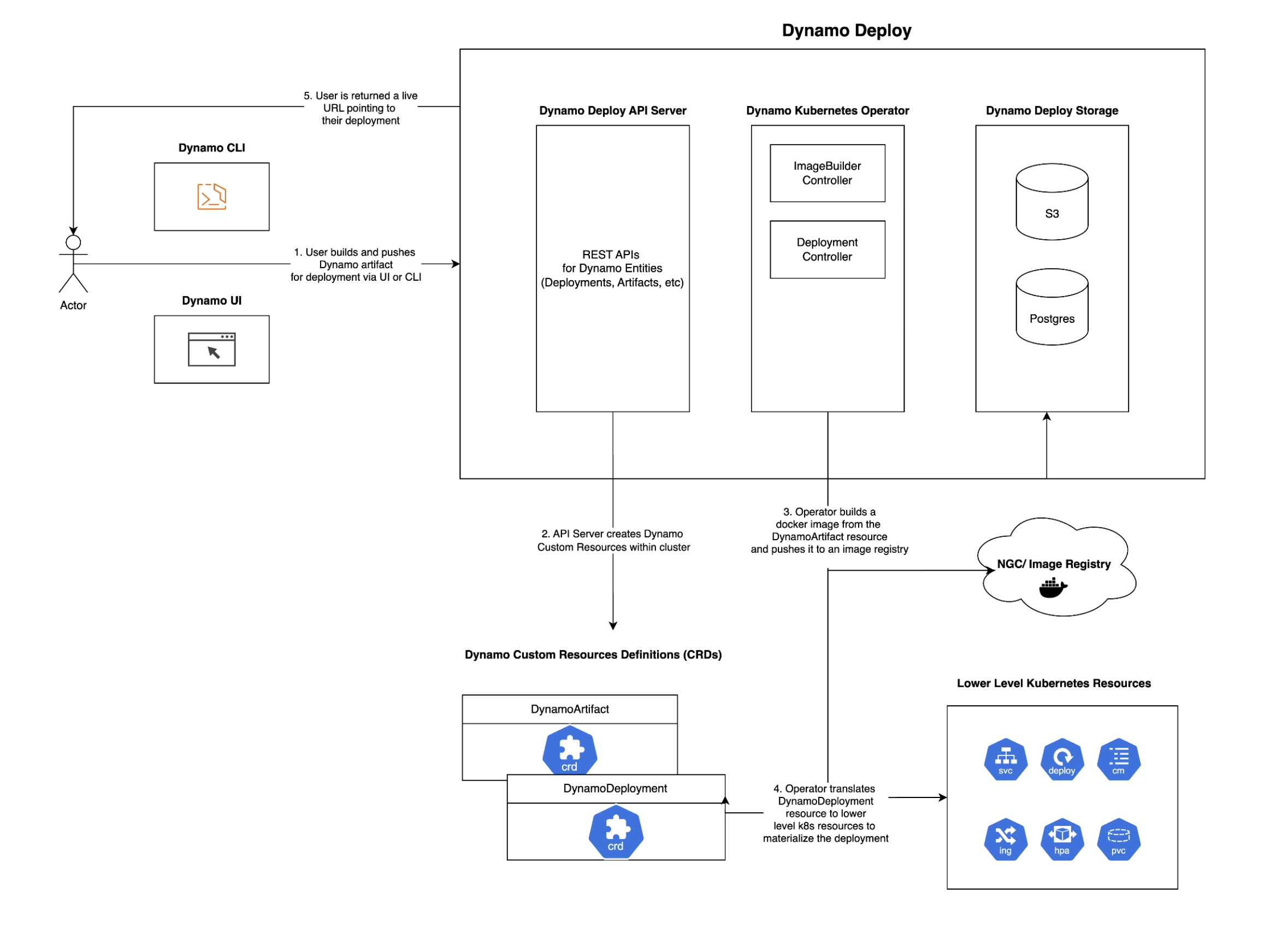
The Dynamo Cloud platform is a comprehensive solution for deploying and managing Dynamo inference graphs (also referred to as pipelines) in Kubernetes environments. It provides a streamlined experience for deploying, scaling, and monitoring your inference services. You can interface with Dynamo Cloud using the deploy subcommand available in the Dynamo CLI (for example, dynamo deploy)
Overview#
The Dynamo cloud platform consists of several key components:
-
Dynamo Operator: A Kubernetes operator that manages the lifecycle of Dynamo inference graphs from build ➡️ deploy. For more information on the operator, see Dynamo Kubernetes Operator Documentation
-
API Store: Stores and manages service configurations and metadata related to Dynamo deployments. Needs to be exposed externally.
-
Custom Resources: Kubernetes custom resources for defining and managing Dynamo services
These components work together to provide a seamless deployment experience, handling everything from containerization to scaling and monitoring.
Prerequisites#
Before getting started with the Dynamo cloud platform, ensure you have:
-
A Kubernetes cluster (version 1.24 or later)
-
Earthly installed for building components
-
Docker installed and running
-
Access to a container registry (e.g., Docker Hub, NVIDIA NGC, etc.)
-
kubectlconfigured to access your cluster -
Helm installed (version 3.0 or later)
Tip
Don’t have a Kubernetes cluster? Check out our Minikube setup guide to set up a local environment!
Building Docker Images for Dynamo Cloud Components#
The Dynamo cloud platform components need to be built and pushed to a container registry before deployment. You can build these components individually or all at once.
Setting Up Environment Variables#
First, set the required environment variables for building and pushing images:
Set your container registry
export DOCKER_SERVER=<CONTAINER_REGISTRY>
Set the image tag (e.g., latest, 0.0.1, etc.)
export IMAGE_TAG=<TAG>
Where:
-
<CONTAINER_REGISTRY>: Your container registry (e.g.,nvcr.io,docker.io/<your-username>, etc.) -
<TAG>: The version tag for your images (e.g.,latest,0.0.1,v1.0.0)
Important Make sure you’re logged in to your container registry before pushing images. For example:
docker login <CONTAINER_REGISTRY>
Building Components#
You can build and push all platform components at once:
earthly --push +all-docker --DOCKER_SERVER=$DOCKER_SERVER --IMAGE_TAG=$IMAGE_TAG
Deploying the Dynamo Cloud Platform#
Once you’ve built and pushed the components, you can deploy the platform to your Kubernetes cluster.
Prerequisites#
Before deploying Dynamo Cloud, ensure your Kubernetes cluster meets the following requirements:
PVC Support with Default Storage Class#
Dynamo Cloud requires Persistent Volume Claim (PVC) support with a default storage class. Verify your cluster configuration:
Check if default storage class exists
kubectl get storageclass
Expected output should show at least one storage class marked as (default)
Example:
NAME PROVISIONER RECLAIMPOLICY VOLUMEBINDINGMODE ALLOWVOLUMEEXPANSION AGE
standard (default) kubernetes.io/gce-pd Delete Immediate true 1d
Cloud Provider-Specific deployment#
Google Kubernetes Engine (GKE) deployment#
You can find detailed instructions for deployment in GKE here
Installation#
- Set the required environment variables:
export DOCKER_USERNAME=<your-docker-username> export DOCKER_PASSWORD=<your-docker-password> export DOCKER_SERVER=<your-docker-server> export IMAGE_TAG=<TAG> # Use the same tag you used when building the images export NAMESPACE=dynamo-cloud # change this to whatever you want!
Note
DOCKER_USERNAME and DOCKER_PASSWORD are optional and only needed if you want to pull docker images from a private registry. A docker image pull secret is created automatically if these variables are set. Its name is docker-imagepullsecret unless overridden by the DOCKER_SECRET_NAME environment variable.
The Dynamo Cloud Platform auto-generates docker images for pipelines and pushes them to a container registry. By default, the platform uses the same container registry as the platform components (specified by DOCKER_SERVER). However, you can specify a different container registry for pipelines by additionally setting the following environment variables:
export PIPELINES_DOCKER_SERVER=<your-docker-server> export PIPELINES_DOCKER_USERNAME=<your-docker-username> export PIPELINES_DOCKER_PASSWORD=<your-docker-password>
If you wish to expose your Dynamo Cloud Platform externally, you can setup the following environment variables:
if using ingress
export INGRESS_ENABLED="true" export INGRESS_CLASS="nginx" # or whatever ingress class you have configured
if using istio
export ISTIO_ENABLED="true" export ISTIO_GATEWAY="istio-system/istio-ingressgateway" # or whatever istio gateway you have configured
Running the installation script with --interactive guides you through the process of exposing your Dynamo Cloud Platform externally if you don’t want to set these environment variables manually.
- [One-time Action] Create a new kubernetes namespace and set it as your default.
cd deploy/cloud/helm kubectl create namespace $NAMESPACE kubectl config set-context --current --namespace=$NAMESPACE
- Deploy the Helm charts (install CRDs first, then platform) using the deployment script:
./deploy.sh --crds
if you want guidance during the process, run the deployment script with the --interactive flag:
./deploy.sh --crds --interactive
omitting --crds will skip the CRDs installation/upgrade. This is useful when installing on a shared cluster as CRDs are cluster-scoped resources.
- Expose Dynamo Cloud Externally
Note
The script automatically displays information about the endpoint that you can use to access Dynamo Cloud. We refer to this externally available endpoint as DYNAMO_CLOUD.
The simplest way to expose the dynamo-store service within the namespace externally is to use a port-forward:
kubectl port-forward svc/dynamo-store <local-port>:80 -n $NAMESPACE export DYNAMO_CLOUD=http://localhost:<local-port>
Next Steps#
After deploying the Dynamo cloud platform, you can:
-
Deploy your first inference graph using the Dynamo CLI
-
Deploy Dynamo LLM pipelines to Kubernetes using the Dynamo CLI
-
Manage your deployments using the Dynamo CLI
For more detailed information about deploying inference graphs, see the Dynamo Deploy Guide.
Installation using published helm chart#
To install Dynamo Cloud using the published Helm chart, you’ll need to configure Docker registry credentials and image settings. The chart supports both direct credential configuration and existing Kubernetes secrets.
Configuration Options#
You have two options for providing Docker registry credentials:
Option 1: Direct Credentials (Simpler for testing)
-
Provide username and password directly via Helm values
-
Credentials are stored in a Kubernetes secret created by the chart
Option 2: Existing Secret (Recommended for production)
-
Use an existing Kubernetes secret containing Docker registry credentials
-
More secure and follows Kubernetes best practices
Environment Setup#
Set the required environment variables:
Docker registry configuration
export DOCKER_SERVER="your-registry.com" # Docker registry server where images of dynamo cloud services (api-server and operator) are available export IMAGE_TAG="v1.0.0" # Image tag to deploy export NAMESPACE="dynamo-cloud" # Target namespace
Pipeline-specific Docker registry (can be different from DOCKER_SERVER)
export PIPELINES_DOCKER_SERVER="your-pipeline-registry.com" # Registry for pipeline images
Option 1: Direct credentials
export PIPELINES_DOCKER_USERNAME="your-username" export PIPELINES_DOCKER_PASSWORD="your-password"
Option 2: Existing secret (recommended)
export PIPELINES_DOCKER_CREDS_SECRET="my-docker-secret" # Name of existing secret
Note: If not specified, the chart will look for a secret named "dynamo-regcred"
Image pull secret for the operator itself
export DOCKER_SECRET_NAME="my-pull-secret" # Secret for pulling images of dynamo cloud services (api-server and operator) operator images
you can easily create an image pull secret with the following command :
kubectl create secret docker-registry ${DOCKER_SECRET_NAME}
--docker-server=${DOCKER_SERVER}
--docker-username=${DOCKER_USERNAME}
--docker-password=${DOCKER_PASSWORD}
--namespace=${NAMESPACE}
Installation Commands#
Step 1: Install Custom Resource Definitions (CRDs)
helm install dynamo-crds dynamo-crds-helm-chart.tgz
--namespace default
--wait
--atomic
Step 2: Install Dynamo Platform
Choose one of the following approaches based on your credential configuration:
Using Direct Credentials:
helm install dynamo-platform dynamo-platform-helm-chart.tgz
--namespace ${NAMESPACE}
--create-namespace
--set "dynamo-operator.controllerManager.manager.image.repository=${DOCKER_SERVER}/dynamo-operator"
--set "dynamo-operator.controllerManager.manager.image.tag=${IMAGE_TAG}"
--set "dynamo-operator.imagePullSecrets[0].name=${DOCKER_SECRET_NAME}"
--set "dynamo-operator.dynamo.dockerRegistry.server=${PIPELINES_DOCKER_SERVER:-$DOCKER_SERVER}"
--set "dynamo-operator.dynamo.dockerRegistry.username=${PIPELINES_DOCKER_USERNAME}"
--set "dynamo-operator.dynamo.dockerRegistry.password=${PIPELINES_DOCKER_PASSWORD}"
--set "dynamo-api-store.image.repository=${DOCKER_SERVER}/dynamo-api-store"
--set "dynamo-api-store.image.tag=${IMAGE_TAG}"
--set "dynamo-api-store.imagePullSecrets[0].name=${DOCKER_SECRET_NAME}"
Using Existing Secret (Recommended):
helm install dynamo-platform dynamo-platform-helm-chart.tgz
--namespace ${NAMESPACE}
--create-namespace
--set "dynamo-operator.controllerManager.manager.image.repository=${DOCKER_SERVER}/dynamo-operator"
--set "dynamo-operator.controllerManager.manager.image.tag=${IMAGE_TAG}"
--set "dynamo-operator.imagePullSecrets[0].name=${DOCKER_SECRET_NAME}"
--set "dynamo-operator.dynamo.dockerRegistry.server=${PIPELINES_DOCKER_SERVER:-$DOCKER_SERVER}"
--set "dynamo-operator.dynamo.dockerRegistry.existingSecretName=${PIPELINES_DOCKER_CREDS_SECRET:-dynamo-regcred}"
--set "dynamo-api-store.image.repository=${DOCKER_SERVER}/dynamo-api-store"
--set "dynamo-api-store.image.tag=${IMAGE_TAG}"
--set "dynamo-api-store.imagePullSecrets[0].name=${DOCKER_SECRET_NAME}"
[!Note]
-
If
PIPELINES_DOCKER_SERVERis not set, it defaults toDOCKER_SERVER -
If
PIPELINES_DOCKER_CREDS_SECRETis not set, the chart will look for a secret nameddynamo-regcred
Links/Buttons:
- Skip to main content
- document.write(
<img src="../../_static/nvidia-logo-horiz-rgb-wht-for-screen.svg" class="logo__image only-dark" alt="Dynamo - Home"/>); Dynamo - GitHub
- Support Matrix
- Getting Started
- High Level Architecture
- Distributed Runtime
- Disaggregated Serving
- KV Block Manager
- Motivation
- KVBM Architecture
- Understanding KVBM components
- KVBM Further Reading
- KV Cache Routing
- Planner
- Load-based Planner
- SLA-based Planner
- Dynamo Architecture Flow
- CLI Overview
- Running Dynamo (dynamo run)
- Serving Inference Graphs (dynamo serve)
- Building Dynamo (dynamo build)
- Deploying Inference Graphs (dynamo deploy)
- Writing Python Workers in Dynamo
- Disaggregation and Performance Tuning
- KV Cache Router Performance Tuning
- Working with Dynamo Kubernetes Operator
- Dynamo Cloud Kubernetes Platform
- Deploying Dynamo Inference Graphs to Kubernetes using the Dynamo Cloud Platform
- Manual Helm Deployment
- GKE Setup Guide
- Minikube Setup Guide
- Model Caching with Fluid
- Planner Benchmark Example
- SDK Reference
- Python API
- Hello World Example: Basic
- Hello World Example: Aggregated and Disaggregated Deployment
- LLM Deployment Examples
- Multinode Examples
- LLM Deployment Examples using TensorRT-LLM
- Glossary
- #
- Earthly
- Privacy Policy
- Manage My Privacy
- Do Not Sell or Share My Data
- Terms of Service
- Accessibility
- Corporate Policies
- Product Security
- Contact