Dynamo Cloud Kubernetes Platform (Dynamo Deploy) — Dynamo
Title: Dynamo Cloud Kubernetes Platform (Dynamo Deploy)#
Published Time: Wed, 02 Jul 2025 21:58:31 GMT
Markdown Content:
The Dynamo Cloud platform is a comprehensive solution for deploying and managing Dynamo inference graphs (also referred to as pipelines) in Kubernetes environments. It provides a streamlined experience for deploying, scaling, and monitoring your inference services. You can interface with Dynamo Cloud using the deploy subcommand available in the Dynamo CLI (for example, dynamo deploy)
Overview#
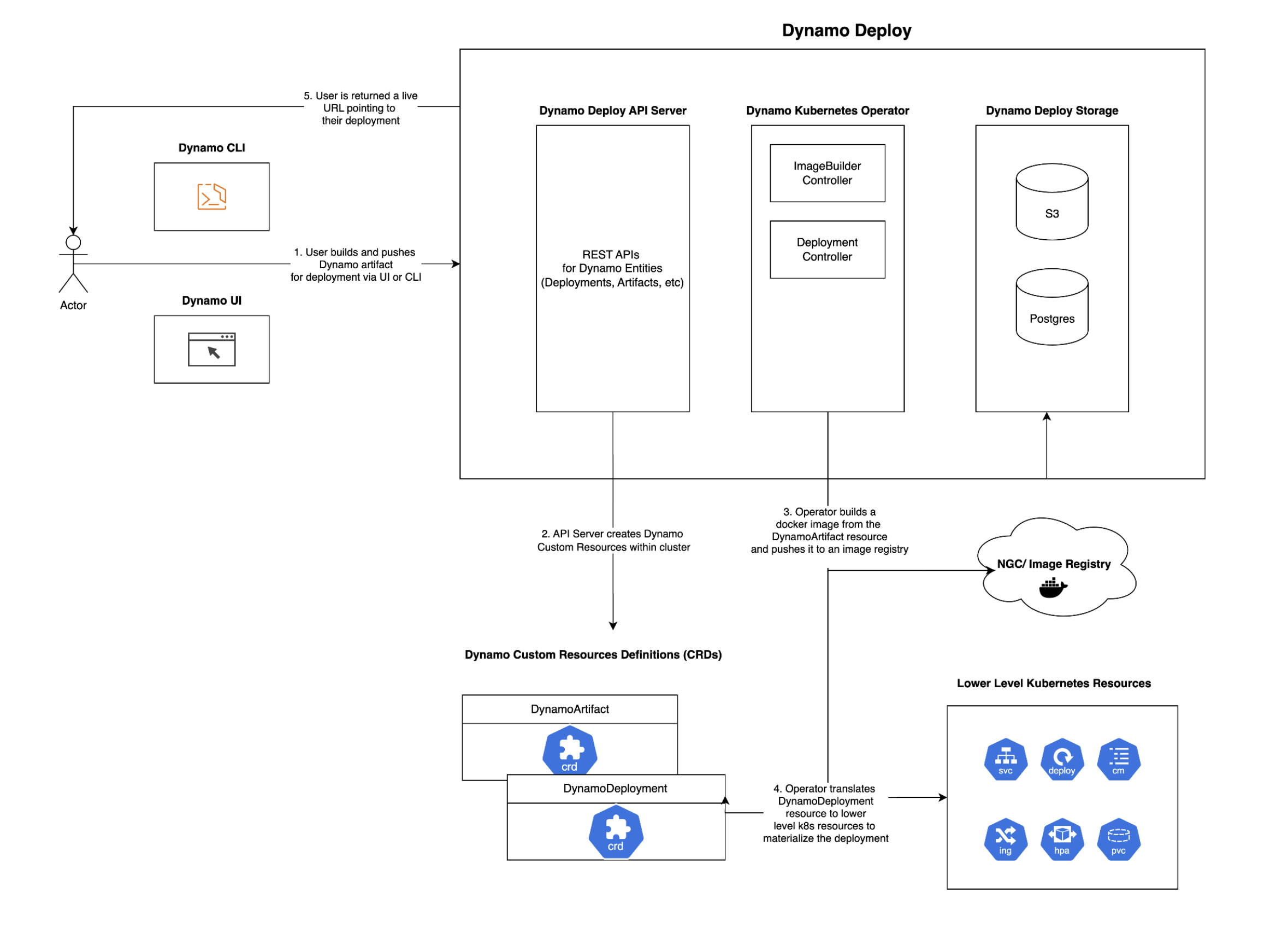
The Dynamo cloud platform consists of several key components:
-
Dynamo Operator: A Kubernetes operator that manages the lifecycle of Dynamo inference graphs from build ➡️ deploy. For more information on the operator, see Dynamo Kubernetes Operator Documentation
-
API Store: Stores and manages service configurations and metadata related to Dynamo deployments. Needs to be exposed externally.
-
Custom Resources: Kubernetes custom resources for defining and managing Dynamo services
These components work together to provide a seamless deployment experience, handling everything from containerization to scaling and monitoring.
Prerequisites#
Before getting started with the Dynamo cloud platform, ensure you have:
-
A Kubernetes cluster (version 1.24 or later)
-
Earthly installed for building components
-
Docker installed and running
-
Access to a container registry (e.g., Docker Hub, NVIDIA NGC, etc.)
-
kubectlconfigured to access your cluster -
Helm installed (version 3.0 or later)
Tip
Don’t have a Kubernetes cluster? Check out our Minikube setup guide to set up a local environment!
Building Docker Images for Dynamo Cloud Components#
The Dynamo cloud platform components need to be built and pushed to a container registry before deployment. You can build these components individually or all at once.
Setting Up Environment Variables#
First, set the required environment variables for building and pushing images:
Set your container registry
export DOCKER_SERVER=<CONTAINER_REGISTRY>
Set the image tag (e.g., latest, 0.0.1, etc.)
export IMAGE_TAG=<TAG>
Where:
-
<CONTAINER_REGISTRY>: Your container registry (e.g.,nvcr.io,docker.io/<your-username>, etc.) -
<TAG>: The version tag for your images (e.g.,latest,0.0.1,v1.0.0)
Important Make sure you’re logged in to your container registry before pushing images. For example:
docker login <CONTAINER_REGISTRY>
Building Components#
You can build and push all platform components at once:
earthly --push +all-docker --DOCKER_SERVER=$DOCKER_SERVER --IMAGE_TAG=$IMAGE_TAG
Deploying the Dynamo Cloud Platform#
Once you’ve built and pushed the components, you can deploy the platform to your Kubernetes cluster.
Prerequisites#
Before deploying Dynamo Cloud, ensure your Kubernetes cluster meets the following requirements:
PVC Support with Default Storage Class#
Dynamo Cloud requires Persistent Volume Claim (PVC) support with a default storage class. Verify your cluster configuration:
Check if default storage class exists
kubectl get storageclass
Expected output should show at least one storage class marked as (default)
Example:
NAME PROVISIONER RECLAIMPOLICY VOLUMEBINDINGMODE ALLOWVOLUMEEXPANSION AGE
standard (default) kubernetes.io/gce-pd Delete Immediate true 1d
Installation#
- Set the required environment variables:
export DOCKER_USERNAME=<your-docker-username> export DOCKER_PASSWORD=<your-docker-password> export DOCKER_SERVER=<your-docker-server> export IMAGE_TAG=<TAG> # Use the same tag you used when building the images export NAMESPACE=dynamo-cloud # change this to whatever you want!
Note
DOCKER_USERNAME and DOCKER_PASSWORD are optional and only needed if you want to pull docker images from a private registry. A docker image pull secret is created automatically if these variables are set. Its name is docker-imagepullsecret unless overridden by the DOCKER_SECRET_NAME environment variable.
The Dynamo Cloud Platform auto-generates docker images for pipelines and pushes them to a container registry. By default, the platform uses the same container registry as the platform components (specified by DOCKER_SERVER). However, you can specify a different container registry for pipelines by additionally setting the following environment variables:
export PIPELINES_DOCKER_SERVER=<your-docker-server> export PIPELINES_DOCKER_USERNAME=<your-docker-username> export PIPELINES_DOCKER_PASSWORD=<your-docker-password>
If you wish to expose your Dynamo Cloud Platform externally, you can setup the following environment variables:
if using ingress
export INGRESS_ENABLED="true" export INGRESS_CLASS="nginx" # or whatever ingress class you have configured
if using istio
export ISTIO_ENABLED="true" export ISTIO_GATEWAY="istio-system/istio-ingressgateway" # or whatever istio gateway you have configured
Running the installation script with --interactive guides you through the process of exposing your Dynamo Cloud Platform externally if you don’t want to set these environment variables manually.
- [One-time Action] Create a new kubernetes namespace and set it as your default.
cd deploy/cloud/helm kubectl create namespace $NAMESPACE kubectl config set-context --current --namespace=$NAMESPACE
- Deploy the Helm charts (install CRDs first, then platform) using the deployment script:
./deploy.sh --crds
if you want guidance during the process, run the deployment script with the --interactive flag:
./deploy.sh --crds --interactive
omitting --crds will skip the CRDs installation/upgrade. This is useful when installing on a shared cluster as CRDs are cluster-scoped resources.
- Expose Dynamo Cloud Externally
Note
The script automatically displays information about the endpoint that you can use to access Dynamo Cloud. We refer to this externally available endpoint as DYNAMO_CLOUD.
The simplest way to expose the dynamo-store service within the namespace externally is to use a port-forward:
kubectl port-forward svc/dynamo-store <local-port>:80 -n $NAMESPACE export DYNAMO_CLOUD=http://localhost:<local-port>
Next Steps#
After deploying the Dynamo cloud platform, you can:
-
Deploy your first inference graph using the Dynamo CLI
-
Deploy Dynamo LLM pipelines to Kubernetes using the Dynamo CLI
-
Manage your deployments using the Dynamo CLI
For more detailed information about deploying inference graphs, see the Dynamo Deploy Guide.
Links/Buttons:
- Skip to main content
- document.write(
<img src="../../_static/nvidia-logo-horiz-rgb-wht-for-screen.svg" class="logo__image only-dark" alt="Dynamo - Home"/>); Dynamo - GitHub
- Support Matrix
- Getting Started
- High Level Architecture
- Distributed Runtime
- Disaggregated Serving
- KV Block Manager
- Motivation
- KVBM Architecture
- Understanding KVBM components
- KVBM Further Reading
- KV Cache Routing
- Planner
- CLI Overview
- Running Dynamo (dynamo run)
- Serving Inference Graphs (dynamo serve)
- Building Dynamo (dynamo build)
- Deploying Inference Graphs (dynamo deploy)
- Writing Python Workers in Dynamo
- Disaggregation and Performance Tuning
- KV Cache Router Performance Tuning
- Working with Dynamo Kubernetes Operator
- Dynamo Cloud Kubernetes Platform
- Deploying Dynamo Inference Graphs to Kubernetes using the Dynamo Cloud Platform
- Manual Helm Deployment
- Minikube Setup Guide
- Model Caching with Fluid
- Planner Benchmark Example
- SDK Reference
- Python API
- Hello World Example: Basic
- Hello World Example: Aggregated and Disaggregated Deployment
- LLM Deployment Examples
- Multinode Examples
- LLM Deployment Examples using TensorRT-LLM
- #
- Earthly
- Privacy Policy
- Manage My Privacy
- Do Not Sell or Share My Data
- Terms of Service
- Accessibility
- Corporate Policies
- Product Security
- Contact